728x90
반응형

1. 우선 node.js를 깔은 후 


콘다환경이라면 

conda install -c conda-forge nodejs

2. ipywidgets 설치

conda install -c conda-forge ipywidgets

아래글 참조


[jupyter lab 3] 주피터 랩 3 tqdm, update jupyter and ipywidgets.

주피터 랩 3.0 - jupyter lab 3.0 주피터 랩 3.0 에서는 아래와 같이 해야 한다. 1. nodejs 가 설치 안되 있으면 설치해야 한다. 2. importerror: iprogress not found. please update jupyter and ipywidgets. 임..

uwgdqo.tistory.com


콘다 환경이라면 conda install 이용

아니면 pip install 하세요

주피터 랩 3 익스텐션 탭에서 바로 설치시 실행이 안될 수도 있습니다. 


1. 헤딩 접기 (Collapsible Headings)

aquirdTurtle/Collapsible_Headings: Implements Collapsible Headers for Jupyter Lab Notebooks (github.com)


aquirdTurtle/Collapsible_Headings

Implements Collapsible Headers for Jupyter Lab Notebooks - aquirdTurtle/Collapsible_Headings

github.com
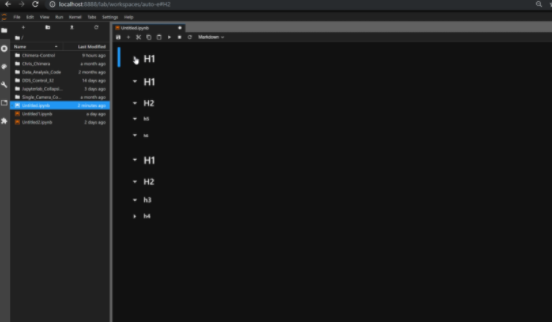
pip 설치 

pip install aquirdturtle_collapsible_headings


2. 리소스 모니터 (Resource Monitor)

jtpio/jupyterlab-system-monitor: JupyterLab extension to display system metrics (github.com)


jtpio/jupyterlab-system-monitor

JupyterLab extension to display system metrics. Contribute to jtpio/jupyterlab-system-monitor development by creating an account on GitHub.

github.com

상단에 (Mem 197MB) 사용중 메모리를 볼 수 있다

pip install jupyterlab-system-monitor
conda install -c conda-forge jupyterlab-system-monitor

3. 변수 인스펙터(variable inspector)

lckr/jupyterlab-variableInspector: Variable Inspector extension for Jupyterlab (github.com)


lckr/jupyterlab-variableInspector

Variable Inspector extension for Jupyterlab. Contribute to lckr/jupyterlab-variableInspector development by creating an account on GitHub.

github.com
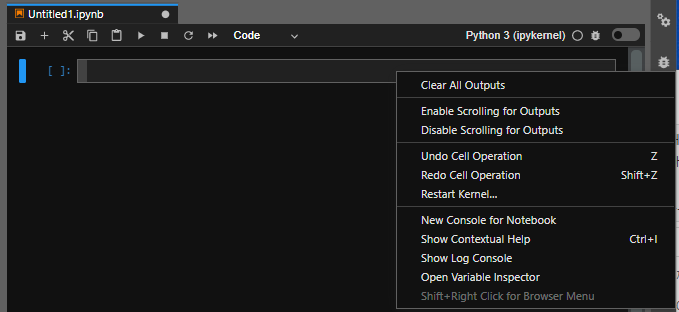
오른쪽 클릭을 하면 Open Variable inspector 이 생긴다

pip install lckr-jupyterlab-variableinspector
conda install -c conda-forge jupyterlab-variableinspector


반응형
728x90
반응형

주피터 랩 3.0  - jupyter lab 3.0 

주피터 랩 3.0 에서는 아래와 같이 해야 한다.


1. nodejs 가 설치 안되 있으면 설치해야 한다.


2. importerror: iprogress not found. please update jupyter and ipywidgets.

임포트 에러가 떠서 아이파이위젯을 업데이트 하라고 나올 시.

conda install -n base -c conda-forge jupyterlab_widgets
conda install -n 자신의가상환경_이름 -c conda-forge ipywidgets

3. 주피터 종료후 다시 킨다.

반응형
728x90
반응형


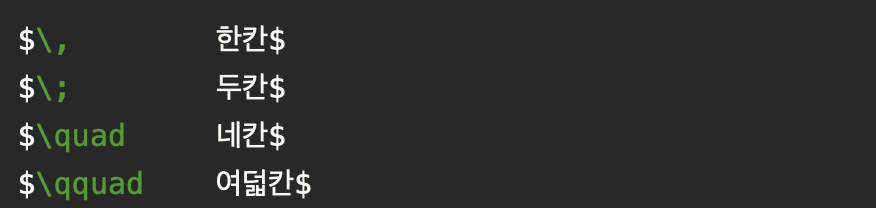
$$ 사이에


\,             한칸

\;             두칸

\quad      네칸

\qquad    여덟칸

\,        # 1 space
\;        # 2 space
\quad     # 4 space
\qquad    # 8 space
반응형
728x90
반응형


centos7에 주피터노트북 설치 


파이썬 3.3버전 이상 또는 2.7


아나콘다 (conda)

conda install -c conda-forge jupyterlab


pip

pip install jupyterlab


실행

jupyter notebook

주피터 노트북 원격접속 


[jupyternotebook] on centos 원격접속

jupyter notebook --generate-config jupyter_notebook_config.py 생성된다 생성된 디렉토리로 이동 vi jupyter_notebook_config.py i 누르고 # 주석 제거 후 c.NotebookApp.ip = 'localhost' 를 c.NotebookApp.ip..

uwgdqo.tistory.com

파이썬2 만 있을때, 파이썬3 추가하고싶을때


[jupyter notebook] python3 커널 추가

주피터 노트북에 파이썬3 커널 추가하기 python3 -m pip install ipykernel python3 -m ipykernel install --user

uwgdqo.tistory.com

markdown


[jupyter notebook markdown]주피터 노트북 마크다운

1. 제목 코드 실행결과 (ctrl-Enter) 2.줄바꿈 그냥 엔터만 눌렀을 경우. 스페이스 두번후 엔터 눌렀을 경우. 또는 이용. 3. 텍스트 색(text color) 텍스트(text) 텍스트(text) 텍스트(text) 텍스트(text) 텍..

uwgdqo.tistory.com


반응형
728x90
반응형

주피터 노트북 마크다운

jupyter notebook markdown


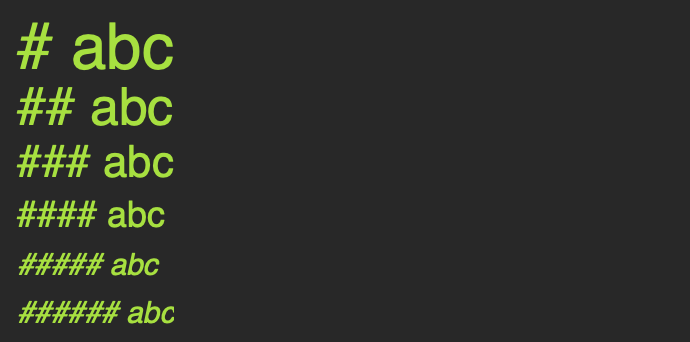
1. 제목


코드

실행결과 (ctrl-Enter)


2. 줄바꿈


그냥 엔터만 눌렀을 경우.

스페이스 두번후 엔터 눌렀을 경우.

또는 <br> 이용.


3. 텍스트 색(text color)


<font color=blue|red|green|pink|yellow>텍스트(text)</font>
<font color=blue>텍스트(text)</font>
<font color=red>텍스트(text)</font>
<font color=green>텍스트(text)</font>
<font color=pink>텍스트(text)</font>
<font color=yellow>텍스트(text)</font>


4.수식


$ 수식 $
예시
{h}_{W,b}{(X)} = ϕ(XW+b)
$ w_{ij}^{(nextstep)} = w_{i,j}+η(y_j−\hat{y}_j)x_i $

가운데

\begin{align*}
{h}_{W,b}{(X)} & = ϕ(XW+b)
\end{align*} 

그릭 알파벳(Greek alphabet)

Greek alphabet.
Name	Symbol	Command
Alpha	αA      \alpha A
Beta	βB      \beta B
Gamma   γΓ      \gamma \Gamma
Delta   δΔ	\delta \Delta
Epsilon	ϵE	\epsilon E
Zeta	ζZ	\zeta Z
Eta	ηE	\eta E
Theta	θΘ	\theta \Theta
Iota	ιI	\iota I
Kappa	κK	\kappa K
Lambda	λΛ	\lambda \Lambda
Mu	μM	\mu M
Nu	νN	\nu N
Omicron	οO	\omicron O
Pi	πΠ	\pi \Pi
Rho	ρR	\rho R
Sigma	σΣ	\sigma \Sigma
Tau	τT	\tau T
Upsilon	υΥ	\upsilon \Upsilon
Phi	ϕΦ	\phi \Phi
Chi	χX	\chi X
Psi	ψΨ	\psi \Psi
Omega	ωΩ	\omega \Omega


5. 밑줄


***
#밑줄 ***사용


6. 볼드체, 이텔릭체


볼드체(Bold): __string__ 또는(or) **string** 이텔릭(Itelic): _string_ 또는(or) *string*


github.com/adam-p/markdown-here/wiki/Markdown-Cheatsheet


adam-p/markdown-here

Google Chrome, Firefox, and Thunderbird extension that lets you write email in Markdown and render it before sending. - adam-p/markdown-here

github.com


반응형

+ Recent posts